TL;DR
The right Salesforce integration middleware builds data trust and enables fast action. This guide compares MuleSoft, Jitterbit, TIBCO, Qlik Talend Cloud, Boomi, and Kafka. Align your choice with specific enterprise architecture goals to govern data and scale operations.
Salesforce integration middleware represents more than a technical choice. It determines whether staff trust the data in Salesforce, whether leadership views the full customer or student journey, and whether teams act before handovers fail.
When Salesforce operates separately from ERP, finance, marketing, student records, ecommerce, support, or legacy platforms, the organisation pays for that fragmentation. Teams duplicate work, produce inconsistent reports, delay decisions, and deliver weaker service.
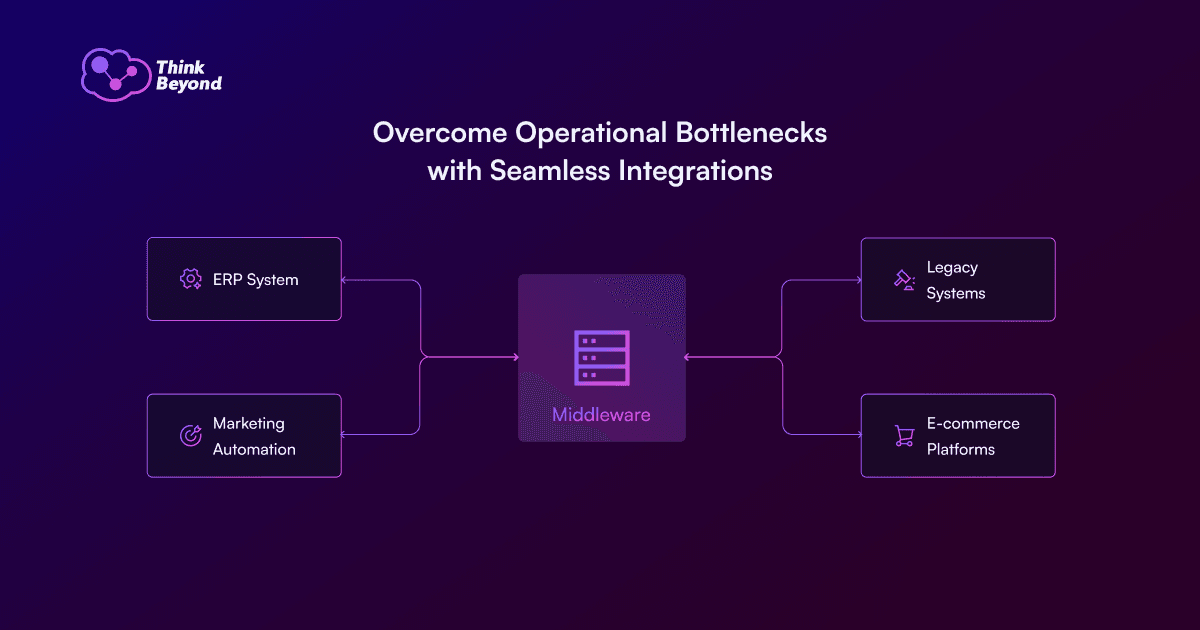
The right middleware achieves more than basic record transfers. It creates a governed integration layer: secure APIs, reusable patterns, monitored data flows, and a resilient digital infrastructure. This infrastructure supports growth and prevents hidden dependencies.
This guide compares five Salesforce integration middleware options leaders frequently evaluate in 2026: MuleSoft, Jitterbit, TIBCO, Qlik Talend Cloud, and Boomi. It also explains where Kafka fits. Event streams increasingly form part of modern Salesforce architecture even when Kafka does not function as a standalone middleware platform.
Before you read on: Use this comparison to clarify the integration model your organisation needs before you select a tool. If your Salesforce estate already depends on manual exports, point-to-point scripts or unmonitored data flows, plan your Salesforce integration roadmap with Think Beyond.
At a Glance: Salesforce Middleware Tools Compared
| Tool | Best fit | Strategic strength | Watch carefully |
|---|---|---|---|
| MuleSoft | Enterprise Salesforce estates and API-led programmes | Reusable APIs, strong governance and deep Salesforce alignment | Licence cost, delivery maturity and architecture discipline |
| Jitterbit | Mid-market and fast-paced integration teams | Low-code integration, templates and quick time-to-value | Complex governance and very large enterprise scale |
| TIBCO | Organisations with real-time, event-led or legacy integration needs | Message queues, event processors and enterprise data platform capability | Product fit and ownership model after portfolio changes |
| Qlik Talend Cloud | Data-intensive integration, quality and analytics pipelines | Data integration, transformation, quality and AI-ready pipelines | Not a like-for-like replacement for every iPaaS workflow |
| Boomi | Broad iPaaS, API, B2B and automation use cases | Large connector ecosystem and unified integration platform | Platform governance as integration volume grows |
| Kafka | Event stream architectures | Decoupled real-time data movement at scale | Requires engineer maturity; not a complete iPaaS |
Why Salesforce Integration Matters
The optimal tool depends on your required operating model, not on a generic rank. Universities, manufacturers, retailers, and financial services organisations all use Salesforce, but they face very different integration risks.
Salesforce generates value only when trusted insights convert into action. Teams achieve this only when they connect the data around Salesforce with deliberate care.
Common integration pain points include:
- Sales teams rely on stale ERP or finance data.
- Marketing teams nurture prospects without the full account or application context.
- Service teams lack visibility into orders, payments, entitlements, or student support histories.
- Leadership teams manually reconcile reports because systems define the same metric differently.
- Staff export spreadsheets to bridge gaps that governed tools should handle.
Fragmented systems severely restrict service efficiency. Before we delivered the Zendesk to Salesforce Service Cloud Migration at Thinkproject, the client struggled with siloed data across disparate platforms. We consolidated their CRM records and connected third-line support systems like Jira and Azure DevOps directly into Salesforce. This architectural shift established a unified 360-degree customer view, eliminated redundant licence costs, and accelerated case resolution times.
"The best integration tool doesn't live in a back-office shadow; it lives in the hands of the person who actually understands the customer's problem."
Rod Martinsmith, Sales Director UK, Think Beyond
Effective system connections protect three outcomes:
- Trust: staff know the data remains current, complete, and properly owned.
- Speed: teams act without manual handovers.
- Resilience: the organisation changes systems without a complete rebuild of every process.
MuleSoft: Best for Enterprise API-Led Integration
MuleSoft Anypoint Platform serves as the natural first option for many Salesforce-led enterprise strategies. As part of the Salesforce ecosystem, Salesforce focuses MuleSoft heavily on API-led connectivity. Developers create reusable APIs to unlock data, compose business processes, and deliver connected experiences.
For larger organisations, this structural approach matters because system connections quickly become governance problems. Without reusable APIs, every project generates another custom connection. With API-led models, the organisation builds a composable foundation.
MuleSoft provides the strongest fit when you need:
- Enterprise API management and lifecycle governance.
- Hybrid connections across cloud, on-premise, and legacy systems.
- Reusable assets across multiple departments or business units.
- Stronger security, monitors, and operational controls.
- A long-term Salesforce platform strategy rather than a single tactical link.
Maturity represents the main trade-off. MuleSoft delivers immense power, but it rewards organisations that invest heavily in architecture, delivery standards, API ownership, and platform governance. If your team only needs a small, isolated link, MuleSoft provides more capability than the project requires.
Jitterbit: Best for Fast Low-Code Salesforce Integration
Organisations often find Jitterbit attractive when they demand speed, usability, and a lower-code delivery model. It offers drag-and-drop design tools, pre-built connectors, and templates for common scenarios.
For teams without a large technical centre of excellence, this approach proves valuable. The platform helps teams connect Salesforce with SaaS, cloud, and on-premise applications without manual code for every workflow.
Do disconnected systems limit your business visibility? Explore our Salesforce Integration Services to unite your enterprise applications and create a reliable single source of truth.
Jitterbit provides the strongest fit when you need:
- Faster delivery for common Salesforce-to-business-system connections.
- Low-code tools to simplify design and maintenance tasks.
- Pre-built connectors for applications such as ERP, ecommerce, and finance systems.
- A practical route away from manual imports, exports, and spreadsheet handovers.
Long-term governance represents the trade-off. As the volume of workflows grows, leaders still must establish clear ownership, monitors, error rules, and data quality standards. Low-code tools still require operational discipline.
TIBCO: Best for Event-Led and Complex Enterprise Environments
TIBCO dominates complex environments where real-time data, message queues, event processors, and resilience matter. Its portfolio historically serves organisations with demanding enterprise architecture, legacy systems, and real-time operational requirements.
For Salesforce, TIBCO gains relevance where the estate extends beyond a simple set of SaaS applications. It serves legacy platforms, high-volume event streams, message-based links, and operational systems that require low-latency synchronisation.
TIBCO provides the strongest fit when you need:
- Event processes and real-time data responsiveness.
- Connections across legacy, hybrid, edge, and multicloud environments.
- Enterprise-grade message queues and operational resilience.
- A broader data platform approach rather than a narrow CRM project.
Product fit represents the primary trade-off. You must assess TIBCO against specific patterns, available skills, and current product roadmaps. It serves complex environments well but rarely acts as the simplest choice for standard Salesforce tasks.
Qlik Talend Cloud: Best for Data Integration, Quality and Analytics Pipelines
Leaders should no longer view Talend through the old open-source Talend Open Studio lens. Qlik discontinued Talend Open Studio effective January 31, 2024. The company now directs users toward commercial Qlik Talend capabilities, including Qlik Talend Cloud.
For Salesforce, Qlik Talend Cloud applies best when you solve problems related to trusted data movement, transformations, quality, and analytics readiness. This differs significantly from a simple app-to-app synchronisation.
Qlik Talend Cloud provides the strongest fit when you need:
- Data pipelines for warehouses, lakes, and analytics tools.
- Data quality, maps, transformations, and governance controls.
- Salesforce data combined with operational and analytical datasets.
- AI-ready data preparation where trust and lineage matter.
Use case clarity represents the trade-off. If your primary need involves workflow automations between Salesforce and a few SaaS tools, a classic iPaaS offers a simpler path. If you must ensure trusted, governed data across Salesforce and analytics, Qlik Talend Cloud deserves serious attention.
Boomi: Best for Broad iPaaS and Connector Coverage
Teams widely use Boomi as an iPaaS option due to its massive connector ecosystem and broad platform capabilities. It spans connections, automations, API management, B2B/EDI, and managed file transfers.
For organisations with many systems, Boomi attracts leaders because it provides a practical environment to build and manage cross-application workflows without a complete restart every time.
Boomi provides the strongest fit when you need:
- A broad iPaaS platform for Salesforce and many surrounding applications.
- A large library of connectors and reusable patterns.
- API management, workflow automations, or B2B/EDI within the same ecosystem.
- A scalable path from initial projects to a wider connected operating model.
Governance at scale represents the trade-off. Boomi helps teams move quickly, but leaders must define naming standards, monitor ownership, error protocols, security controls, and data stewardship rules before the platform becomes business-critical.
Where Kafka Fits in Salesforce Integration
Engineers do not use Apache Kafka as a direct replacement for an iPaaS. It serves as an event stream platform to move and process high-volume events reliably.
Kafka gains relevance when Salesforce participates in a real-time architecture. For example, Salesforce events, order updates, service changes, or application milestones often need to trigger downstream processes without a direct link from every system to Salesforce.
Kafka provides the strongest fit when you need:
- Event-driven models at scale.
- Decoupled links between Salesforce and downstream systems.
- Durable streams of changes that other applications subscribe to.
- Real-time operational reactions rather than scheduled batch synchronisations.
Technical maturity represents the trade-off. Kafka requires careful design, monitors, and strict ownership. It delivers extreme power alongside the right architecture, but it never functions as a plug-and-play middleware answer for standard business teams.
UK Perspective: Navigating Middleware Compliance
UK enterprises face distinct regulatory pressures regarding data residence and privacy under the UK General Data Protection Regulation (UK GDPR). Financial services and public sector bodies must ensure their middleware tools maintain strict audit trails and keep sensitive data within approved geographic boundaries. Organisations must select middleware that natively supports these UK compliance mandates to satisfy domestic regulatory audits without complex workarounds.
How to Choose the Right Salesforce Middleware
Do not ask "Which tool is best?" Instead, ask "Which operating model do we need to build?"
Apply these criteria before you commit:
- Journey impact: Assess which customer, student, staff, or partner journeys improve because teams connected the systems.
- Data ownership: Define which system acts as the source of truth for each critical object.
- Latency: Determine if the business requires real-time, near-real-time, scheduled, or event-driven updates.
- Governance: Assign owners for APIs, credentials, maps, errors, monitors, and change controls.
- Security: Plan how the platform handles encryption, authentication, least privilege, and audit evidence.
- Scale: Verify the pattern survives volume growth, new departments, and additional use cases.
- Total cost: Calculate the real cost across licences, delivery, maintenance, support, and internal resources.
Metrics that prove integration value:
- Manual reconciliation hours removed.
- Reduction in duplicate records or failed synchronisations.
- Time saved in order workflows, enquiry workflows, application reviews, or support processes.
- API reuse rate across projects.
- Number of business-critical links with active monitors.
- Report latency before and after system connection.
- Staff confidence in the data they use for decisions.
How Think Beyond Helps with Salesforce Integration
Think Beyond designs Salesforce connections around strategy rather than basic tool selection. We help leadership and delivery teams to understand which journeys require immediate links, what data teams must trust, and which model survives operational change.
We support Salesforce integration services across:
- Discovery phases and roadmap designs.
- Links between Salesforce, ERP, finance, marketing, student information, and service systems.
- Middleware selection and architecture reviews.
- API governance, data maps, and security designs.
- Remediation of fragile point-to-point scripts.
- Delivery support across MuleSoft, iPaaS, and custom patterns.
Talk to Think Beyond to build a governed Salesforce integration strategy.
FAQ: Practical Salesforce Integration Questions
How do we handle API rate limits when we connect Salesforce with a high-volume ERP?
You must leverage middleware to queue and batch your data requests. Tools like MuleSoft and Boomi intercept high-volume event streams, aggregate the records, and push them to Salesforce in controlled batches via the Bulk API. This mechanism prevents your system from total exhaustion of daily API limits during peak hours.
Should we implement Salesforce MuleSoft or rely solely on native Salesforce Connect?
Use Salesforce Connect when you only need to view external database records inside the Salesforce user interface without permanent data storage. Choose MuleSoft when you need to extract, transform, enrich, and route that data across multiple platforms, or when you must establish complex business logic across several enterprise systems.
What security protocols must our middleware support to protect UK GDPR-regulated data during transit?
Your chosen middleware must support mutual TLS (mTLS) for secure transit and provide field-level encryption. Additionally, the platform must offer robust identity verification protocols, such as OAuth 2.0, and maintain granular logs to satisfy strict UK regulatory compliance audits.
How do we transition from custom point-to-point API scripts to a governed iPaaS model without system downtime?
Adopt a phased, API-led migration strategy. Deploy your new middleware alongside your legacy scripts. Build reusable system APIs to connect your databases first, then gradually re-route specific business processes through the new middleware layer. Deprecate the legacy point-to-point scripts only after comprehensive parallel tests validate data accuracy.
Key Public Sources Referenced